
Rate this tool
No ratings yet — be the first to rate!
Total ratings: 0
Free GST Calculator (India)
A bill that already includes GST hides two numbers inside one total: the price of the item and the tax on it. A shopkeeper quoting a price, a freelancer raising an invoice, or a customer checking a receipt all need those two numbers separated, and separated correctly. This calculator does that in both directions. Add GST when your price excludes tax, remove GST when the bill already includes it, and see the CGST and SGST split for sales within a single state.
How to check a bill with this GST calculator
- Choose Add GST if your amount excludes tax, or Remove GST if it already includes it.
- Enter the amount in rupees, exactly as it appears on the quote or bill.
- Pick the GST slab from the dropdown, or choose Custom and type in another rate.
- Read the five results together and compare them with the invoice.
- For a sale to another state, the same total GST is collected as IGST, not split.
The GST formulas, with a worked example
Adding GST: GST = net x rate / 100; gross = net + GST. Removing GST: net = gross / (1 + rate / 100); GST = gross - net. Within one state, CGST and SGST are each half of GST.
Tested with real numbers. I ran this calculator in both directions at 18%. Adding GST to ₹1,000 showed GST ₹180.00, CGST ₹90.00, SGST ₹90.00 and a gross of ₹1,180.00. Switching to Remove GST and entering the ₹1,180 total gave the same numbers back in reverse: net ₹1,000.00 and GST ₹180.00. I checked both results independently in Python — 1,000 × 18 / 100 = 180, and 1,180 / 1.18 = 1,000 — and the tool matched to the paisa in both directions. More spot checks matched as well: ₹1,000 at 5% gave GST ₹50 and a total of ₹1,050, ₹1,000 at 40% gave GST ₹400 and a total of ₹1,400, and a custom rate of 7.5% on ₹1,000 gave GST ₹75.00 and a total of ₹1,075.00. Reversing ₹1,050 at 5% returned net ₹1,000 and GST ₹50. Entering a negative amount did not calculate at all — the tool showed the message “Please enter a valid amount (0 or more).” The previous results stay on screen until a valid amount is entered.
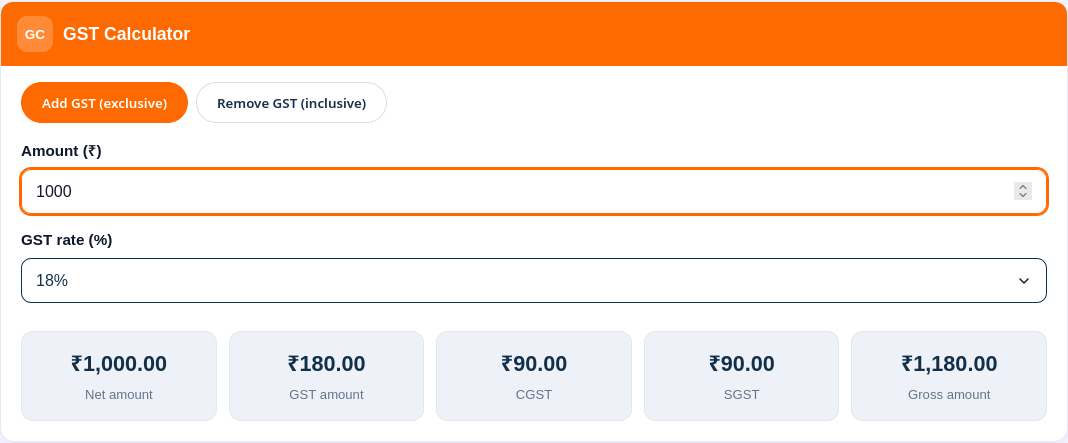
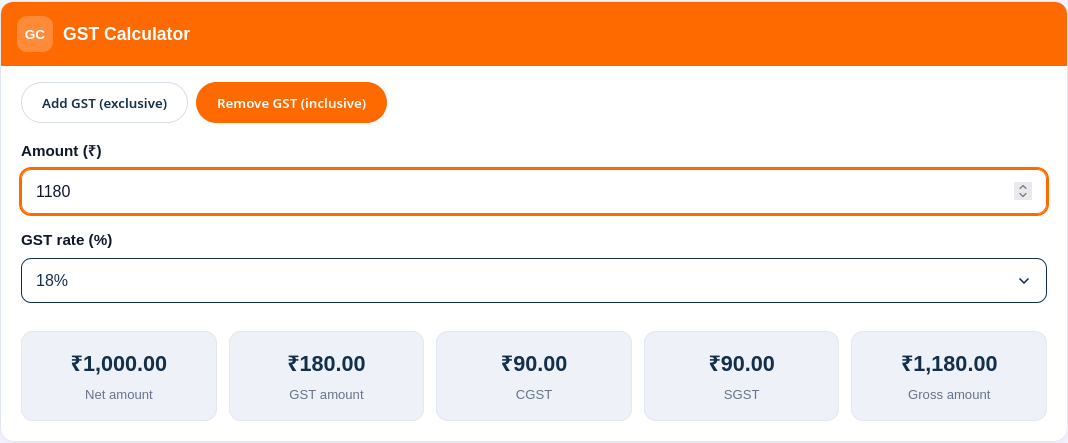
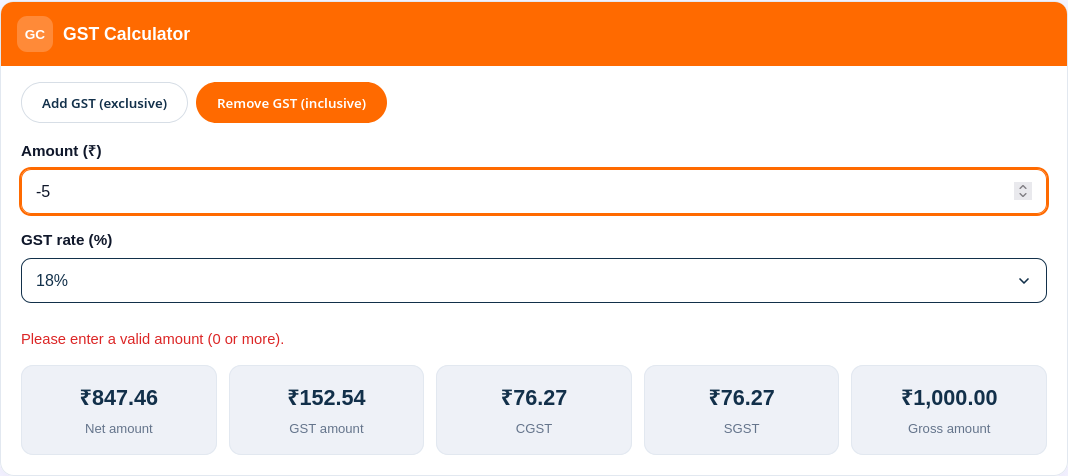
Author’s note. I tested both tabs with the same ₹1,000 and ₹1,180 figures because a calculator that only works in one direction is only half a check. What convinced me was the reverse trip: the tool gave back exactly ₹1,000 and ₹180, and even the awkward ₹1,000 reversal split cleanly into two ₹76.27 halves. If your bill does not reverse to a round number, check the rate printed on the invoice first — in every check I ran, the maths was never the problem.
| GST slab on Rs 1,000 before tax | GST amount | Total with GST |
|---|---|---|
| 0 percent | Rs 0.00 | Rs 1,000.00 |
| 0.1 percent | Rs 1.00 | Rs 1,001.00 |
| 0.25 percent | Rs 2.50 | Rs 1,002.50 |
| 1 percent | Rs 10.00 | Rs 1,010.00 |
| 1.5 percent | Rs 15.00 | Rs 1,015.00 |
| 3 percent | Rs 30.00 | Rs 1,030.00 |
| 5 percent | Rs 50.00 | Rs 1,050.00 |
| 18 percent | Rs 180.00 | Rs 1,180.00 |
| 40 percent | Rs 400.00 | Rs 1,400.00 |
12% and 28% were merged away on 22 September 2025 (GST 2.0). The main slabs are now 0%, 5%, 18% and 40%; the small rates above still apply to special goods — 3% for gold, for example.
Scale any row to your amount, and confirm your item slab from the rate schedule or invoice.
The rounding check: reversing ₹1,000 at 18%
Not every reverse calculation comes out round. Reversing a GST-inclusive ₹1,000 at 18% gave net ₹847.46 and GST ₹152.54, with CGST and SGST of ₹76.27 each — and ₹76.27 + ₹76.27 is exactly ₹152.54, so the split still adds up. I checked this against Python as well (1,000 / 1.18 = 847.46, GST 152.54) and it matched. The tool rounds every displayed figure to two decimals, so a reversed total can land a paisa either side of the bill; that is normal rounding, not an error. One display limit to know: the tool always shows the CGST and SGST split and never labels IGST. For an inter-state sale, read the GST amount itself as IGST — the total is the same, only the label changes.
Common GST mistakes
- Adding GST to an inclusive price. This double-counts tax. Check whether the figure is exclusive or inclusive, then pick the matching tab.
- Splitting IGST into CGST and SGST. Inter-state sales carry IGST as one amount. Only intra-state sales split into equal halves.
- Guessing the slab. The main slabs are 0, 5, 18 and 40 percent, but many items sit elsewhere, including the small slabs above. A wrong slab makes the whole invoice wrong.
- Rounding too early. Round only final amounts to two decimals. Rounding at each step can leave a rupee or two unexplained.
Practical tips for invoices and bills
- Show net, rate, GST and gross as separate invoice lines.
- Keep the rate schedule for items you sell most often, and recheck it when rates change.
- Use the Custom rate for rates outside the dropdown, and check the result against the supplier invoice before paying.
Please note: The GST amounts shown here are estimates based on the rate you select. This is not tax advice — please confirm with a tax professional or the official GST portal before filing or charging GST.
Frequently asked questions
What are CGST and SGST?
For sales within one state, GST is split equally: CGST goes to the Central Government and SGST to the State Government. For inter-state sales, the same total is collected as IGST instead.
Which GST slab applies to my item?
The main slabs since 22 September 2025 (GST 2.0) are 0%, 5%, 18% and 40%; special rates such as 3% for gold still apply. Check the CBIC rate schedule or your invoice to confirm.
What is the difference between GST-inclusive and exclusive?
Exclusive means GST is added on top of the base price. Inclusive means the price you see already contains GST, so this calculator works backwards to find the base price.
Is this GST calculator free?
Yes — completely free, no sign-up. All calculations happen in your browser; nothing is sent anywhere.
When do I pay IGST instead of CGST and SGST?
When buyer and seller are in different states, total GST is collected as IGST instead of being split. Within one state, the same total splits equally into CGST and SGST. The total is the same either way.
How do I check the GST on a bill I received?
Use Remove GST with the bill total and the rate printed on it. The calculator works backwards to net price and tax. If those match the bill, it is consistent; if not, ask the seller to explain before paying.
Do I need a GSTIN to use this calculator?
No. The calculator needs only an amount and a rate, and asks for no registration details. A GSTIN is the registration number a business uses for filing returns and issuing tax invoices.
Why does my reverse calculation differ by a rupee from the bill?
Almost always rounding. Bills round each line to two decimals, and reversing a rounded total can land a rupee either side. A rupee or two is normal; a larger gap means the rate or base amount is wrong.
Want the full walkthrough with screenshots? Read the guide: How to Calculate GST in India — step by step →