
Rate this tool
No ratings yet — be the first to rate!
Total ratings: 0
Free Word Counter
Most writing tasks come with a limit: a 500-word essay, a 250-word answer, or a caption that must fit a character count. Guessing the length wastes a revision. This counter shows your numbers live as you type or paste: words, characters with spaces, characters without spaces, sentences, paragraphs and an estimated reading time. There is no file upload and no sign-up step; you work directly in the box on the page. Below, the exact numbers from a test run on 14 November 2026 — the same paragraph counted by hand first, then by the tool, plus two edge cases that show where the counter disagrees with your eyes.
Check a limit with this word counter in four moves
- Type or paste your text into the box.
- Read the six figures as they update: words, characters, characters without spaces, sentences, paragraphs and reading time.
- Use Copy text to copy everything back out, or Clear to empty the box and start again.
- Compare the word count with your limit before submitting, and leave a small margin, because different counters can disagree by a few words.
Tested on 14 November 2026: the library paragraph, counted twice
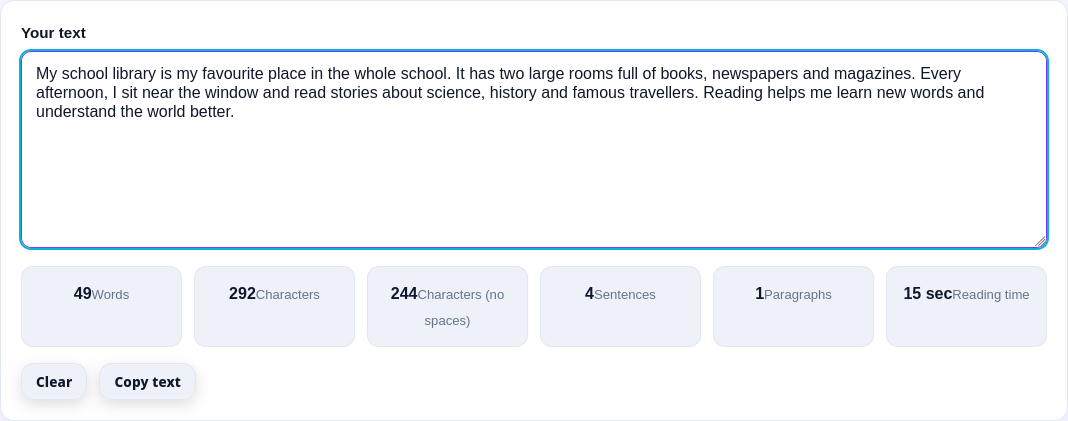
We tested this tool on 14 November 2026 with a paragraph about a school library — the same kind of paragraph a student would paste in before adding it to an essay. We counted it by hand in Python first — words split on whitespace, characters counted with and without spaces, sentences split on full stops, question marks and exclamation marks — and only then pasted the exact same text into the tool to compare. The text was:
“My school library is my favourite place in the whole school. It has two large rooms full of books, newspapers and magazines. Every afternoon, I sit near the window and read stories about science, history and famous travellers. Reading helps me learn new words and understand the world better.”
| Figure | Counted by hand | What the tool showed | Match? |
|---|---|---|---|
| Words | 49 | 49 | Yes |
| Characters (with spaces) | 292 | 292 | Yes |
| Characters (no spaces) | 244 | 244 | Yes |
| Sentences | 4 | 4 | Yes |
| Paragraphs | 1 | 1 | Yes |
| Reading time | 15 seconds | 15 sec | Yes |
All six figures matched exactly. The reading time is worth spelling out, because it is the one figure the tool calculates rather than counts: at 200 words per minute, 49 words take 49 divided by 200, times 60 — 14.7 seconds — rounded up to 15 seconds. The tool shows “15 sec” for anything under a minute, and switches to minutes and seconds for longer texts (a 500-word essay reads as 2 min 30 sec). For the student in this example, the count also answers the real question: her essay needs 500 words, this paragraph is 49, so she needs about 451 more words — roughly nine more paragraphs like this one.
Where the counter disagrees with your eyes
The library paragraph was the easy case. Two more tests from the same day show where the numbers need a second look. The FAQ below already warns about both — and both turned out to be real.
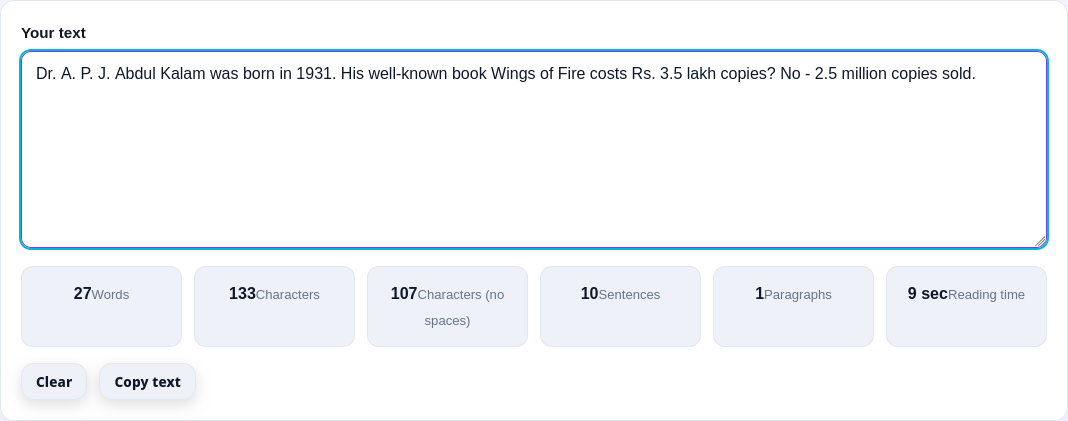
First, abbreviations and decimals. We pasted this sentence: “Dr. A. P. J. Abdul Kalam was born in 1931. His well-known book Wings of Fire costs Rs. 3.5 lakh copies? No - 2.5 million copies sold.” Counted by hand it is 27 words, 133 characters, 107 without spaces — and the tool agreed on all three. But the sentence count came out as 10, not the 3 a reader sees. Every full stop counts as a break: “Dr.”, each letter of “A. P. J.”, “Rs.”, “3.5” and “2.5” all split the text. The counter is doing exactly what its rule says — split on full stops, exclamation marks and question marks — but a biography full of initials will look far longer in sentences than it really is. Ignore the sentence figure for that kind of text and trust the word count instead.
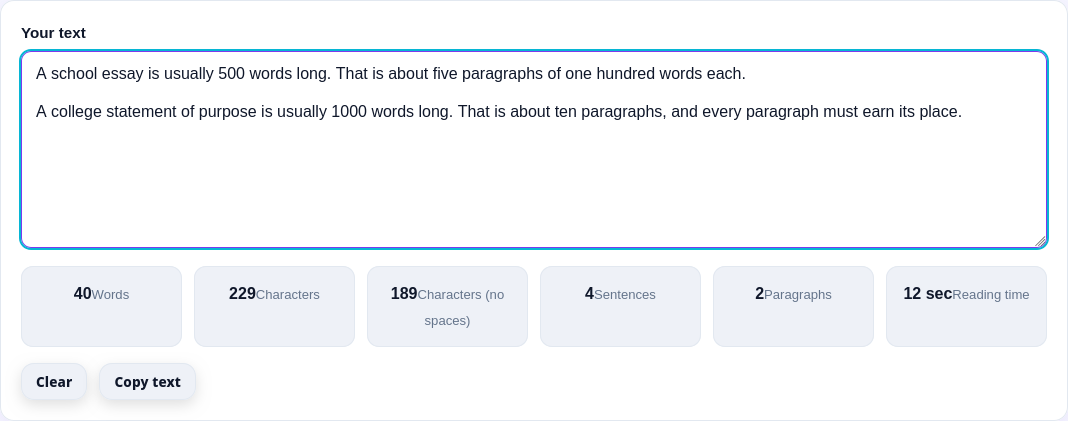
Second, paragraphs. We pasted two short paragraphs separated by a blank line — one about a 500-word school essay, one about a 1000-word college statement of purpose. The tool reported 40 words, 229 characters, 189 without spaces, 4 sentences, 2 paragraphs, and 12 seconds reading time — again, exactly matching the hand count on every figure. The rule that matters here is the blank line: pressing Enter twice starts a new paragraph, while a single line break inside a block may not. If your paragraph count looks wrong, check for the blank line between paragraphs before doubting the tool.
One more check from the same session: extra spaces do not inflate the count. The tool trims the text and splits on runs of whitespace, so pasting from a messy document with double spaces is safe on that point. But a standalone bullet symbol separated by a space does count as a word — so strip bullets and headings out before pasting if your limit is strict, exactly as the FAQ says.
Word-limits table: essay, SOP, UPSC and more
Most word limits in India are round numbers, and they are easier to hit when you know what they mean in paragraphs and minutes. The table below uses the tool's own rules as verified above: words split on whitespace, reading time at 200 words per minute, and speaking time at roughly 140 words per minute (the middle of the 130–150 range in the FAQ below). A paragraph here means 100–200 words — the typical paragraph size the FAQ gives — so the paragraph counts are ranges, not promises.
| Writing task | Word limit | Paragraphs (100–200 words each) | Reading time at 200 wpm | Speaking time at ~140 wpm |
|---|---|---|---|---|
| School essay (Classes 6–10) | 500 words | 3–5 | 2 min 30 sec | About 3 min 30 sec |
| College statement of purpose (SOP) | 1000 words | 5–10 | 5 min | About 7 min |
| UPSC mains answer (10-mark question) | 150 words | 1–2 | 45 sec | About 1 min |
| UPSC mains answer (15-mark question) | 250 words | 2–3 | 1 min 15 sec | About 1 min 45 sec |
| UPSC essay paper (one essay) | 1000–1200 words | 8–12 | 5–6 min | About 7–8 min 30 sec |
| Instagram caption (limit 2,200 characters) | About 300–350 words* | 2–3 | About 1 min 30 sec | About 2 min 30 sec |
*Instagram limits captions by characters (2,200), not words — 300 to 350 words is the rough equivalent at typical word lengths. For a caption, watch the Characters figure in the tool, not the word count.
To use the table with the tool, first paste your draft and read the Words figure against your limit, aiming a few words below the maximum — your teacher's or the exam portal's counter may treat hyphenated words or numbers differently from this one. A hyphenated word such as well-known counts as one word here, because the rule is whitespace, not punctuation; another counter might count it as two. Second, use the reading time to check length by feel: a 500-word essay that reads in 2 minutes 30 seconds is right; if it reads in 90 seconds, you are probably 200 words short. Third, never use reading time for a speech — speaking is slower, roughly a third more time, so a 1000-word SOP read aloud takes about 7 minutes, not 5. If your presentation slot is 5 minutes, 1000 words will overrun it.
One last habit for strict limits: count the final version, not a draft. Paste the text exactly as you will submit it — headings, bullet points, and your name and roll number included if they are part of the submission — because the tool counts everything you paste. Then remove anything that should not count, and paste again. The last number you see is the one to trust.
Counting rules worth knowing before you submit
- A word here means any group of characters separated by spaces, tabs or line breaks. That includes numbers and hyphenated words such as well-known, which counts as one word.
- Sentence counts split on full stops, exclamation marks and question marks, so abbreviations such as Dr. and decimals such as 3.5 can push the sentence count up. Read the count, then judge it yourself.
- Blank lines separate paragraphs. Pressing Enter twice starts a new paragraph, while a single line break inside a block may not.
- Extra spaces do not inflate the count, because the counter trims the text and splits on runs of whitespace. Pasting from a messy document is safe on that point.
- For a strict limit, aim a few words below the maximum. Your teacher's or platform's counter may treat hyphenated words or numbers differently.
Frequently asked questions
Is this word counter free?
Yes, completely free. No sign-up, no limits, no watermarks.
How are words counted?
Words are counted as groups of characters separated by whitespace (spaces, tabs, new lines).
How is the reading time calculated?
Reading time is estimated at an average reading speed of 200 words per minute.
Is my text saved anywhere?
No. Everything runs in your browser — your text never leaves your device and nothing is stored.
How many words are in a paragraph?
A typical paragraph has 100–200 words (about 5–7 sentences). Academic writing usually keeps paragraphs in that range; casual writing can be shorter. Paste your text above to count your total words, sentences and paragraphs live.
Do hyphenated words and numbers count as words?
Yes. Anything separated by whitespace counts as one word, including numbers, dates and hyphenated words such as well-known.
Why is my sentence count higher than I expected?
The counter splits sentences at full stops, exclamation marks and question marks. Abbreviations such as Dr. or Mr., and decimals such as 3.5, therefore look like sentence breaks to the counter.
Does pasted formatting change the count?
The counter counts every word you paste, including headings and list items. A standalone bullet symbol separated by a space can also count as a word, so remove bullets and headings if your limit is strict.
Is reading time the same as speaking time?
No. Reading time here uses 200 words per minute. Speaking aloud is slower, roughly 130 to 150 words per minute, so allow about a third more time when you plan a speech or presentation from the same text.
Want the full walkthrough with worked examples? Read the guide: How Many Words Is This Paragraph? — step by step →