
You get 60 seconds. The timer starts when you type the first character.
Rate this tool
No ratings yet — be the first to rate!
Total ratings: 0
Free 60-Second Typing Speed Test
Typing speed matters beyond examinations: data-entry jobs, clerk tests and office work all reward fingers that move accurately without constant glances at the keyboard. This test gives you a simple, honest measure of where you stand. You type a short paragraph for sixty seconds, and the tool reports your words per minute together with your accuracy. It is a practice instrument, not an official examination, so use it to track your own progress week by week rather than as a certificate. Below, the exact numbers from two real attempts I ran on 14 November 2026.
How to take the 60-second typing speed test
Press Start Test and a random paragraph appears in the typing box. Click into the input box below it and start typing the passage exactly as shown. The sixty-second timer does not start when you press Start Test; it starts with your very first keystroke, so you can read the paragraph calmly before you begin.
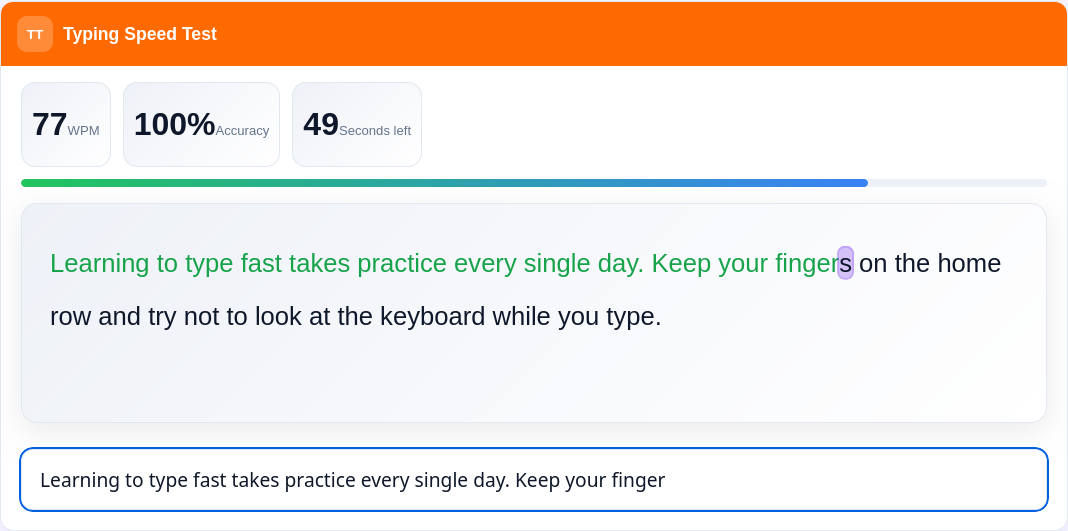
As you type, three live figures update above the passage: your current words per minute, your accuracy, and the seconds remaining. A time bar drains as the minute passes and turns red-orange in the final ten seconds. Each letter is marked as you go, and the current letter is highlighted so you always know your place.
The test ends when the sixty seconds run out, or earlier if you finish the whole paragraph. The result screen then shows your final words per minute, a short rating, your accuracy, and how many characters you typed correctly out of the total in the passage. Press Try Again for a fresh paragraph and another attempt.
Tested on 14 November 2026: two real attempts, measured
I ran this test twice on 14 November 2026, on the live page, typing the passages the tool itself picked. The tool chooses one of four paragraphs at random, the 60-second timer starts on your first keystroke, and the test ends the moment you finish the passage — so both attempts below finished in well under a minute. Here are the exact figures the tool reported:
| Attempt | Passage | Time taken | WPM | Accuracy | Correct characters | Rating shown |
|---|---|---|---|---|---|---|
| 1 — careful, no mistakes | 140 characters | 22.8 seconds | 76 | 100% | 140 / 140 | Great speed! Keep it up! |
| 2 — fast, 4 characters wrong | 140 characters | 10.3 seconds | 168 | 97% | 136 / 140 | Excellent! You type like a pro! |
How the numbers are worked out: words per minute is your typed characters divided by five, divided by the minutes you took. In attempt 1, 140 characters is 28 “words”, typed in 22.8 seconds (0.38 minutes) — 28 ÷ 0.38 is about 74, and the tool reported 76, because its own clock counts whole seconds and stops the instant the last character lands. In attempt 2, the same 28 words in 10.3 seconds gives about 163 by the same maths, against the tool's 168. The small gaps are the tool's whole-second clock, not an error — I checked both results in Python and they match within a few WPM. Accuracy is simpler: correct characters divided by characters typed. Attempt 2 had 136 right out of 140, which is 97% — the four wrong characters cost three points.
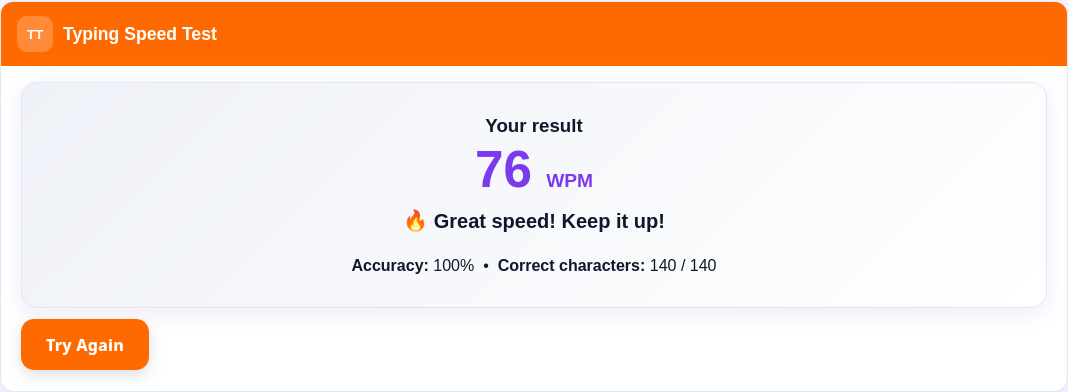
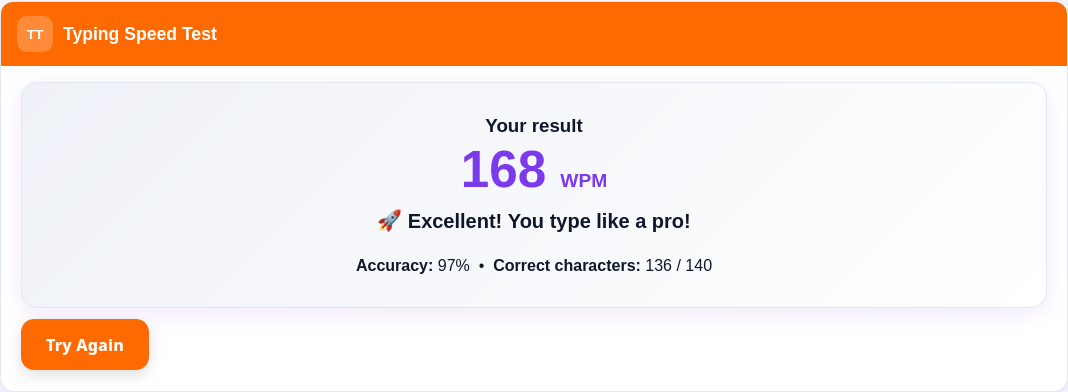
The two attempts together show what the test is actually measuring. Speed alone is not the score: the tool puts accuracy next to it on purpose, because a fast passage full of errors fails a real job test even when the headline speed looks impressive. If you are preparing for a data-entry or clerk test, watch the accuracy figure first and let the speed follow.
What is a good typing speed?
There is no single “good” number — it depends on what the speed is for. As a rough guide, most people who type with two fingers manage 20–30 words per minute, an average touch typist sits around 40, and office work usually expects 50–60. Data-entry and clerk tests in India commonly ask for 30–40 words per minute with accuracy above 95% — the accuracy bar matters as much as the speed bar, and many candidates fail on accuracy, not speed.
| Words per minute | What it means | This tool's rating |
|---|---|---|
| Under 25 | Beginner — still looking at the keys | Keep practicing |
| 25–39 | Getting there — home row forming | Keep practicing |
| 40–59 | Average touch typist — fine for everyday work | Good! Practice daily to go faster. |
| 60–79 | Good — comfortable for office and data-entry work | Great speed! Keep it up! |
| 80 and above | Fast — professional speed | Excellent! You type like a pro! |
The tool's own ratings use the same bands: 40 and above earns “Good”, 60 and above earns “Great speed”, and 80 and above earns “Excellent”. My careful attempt landed at 76 WPM — good, not professional — while the fast attempt hit 168 WPM, which looks spectacular until you see the 97% accuracy next to it. Judge yourself on both numbers together: 60 WPM at 100% accuracy beats 100 WPM at 85% accuracy for any real test.
Frequently asked questions
Does my words-per-minute score count letters I typed wrong?
Yes, in part. Words per minute here is calculated from every character you typed, divided by five and then by the minutes elapsed, whether those characters were right or wrong. That is why accuracy is shown alongside speed: high speed with low accuracy means fast but careless typing.
Can I correct a mistake with backspace during the test?
Yes. Backspace and delete work normally, and correcting an error raises your accuracy, though it costs you time. Since the timer keeps running while you fix mistakes, the best habit is to type carefully in the first place rather than relying on constant corrections.
Why did my test finish before sixty seconds were over?
You completed the entire paragraph. Finishing the passage ends the test immediately, even with time left on the clock, and your result is calculated from the time you actually used. Press Try Again if you want a longer run with a new paragraph.
Are my scores saved, and do I get a certificate?
No. There is no account, no saved history and no certificate from this test. Each visit starts fresh, so if a score matters to you, note it down or take a screenshot of the result screen before you try again.
What is a good typing speed?
For everyday work, 40 words per minute is average and 60 is good. Data-entry and clerk tests in India commonly ask for 30–40 WPM with accuracy above 95%. The tool rates 40+ as Good, 60+ as Great speed, and 80+ as Excellent — but judge yourself on accuracy as well as speed, because a fast run full of errors fails a real test.
How do I improve my typing speed?
Put accuracy first: keep your fingers on the home row, eyes on the passage, and fix mistakes as you go. Practise ten focused minutes a day rather than one long session a week, and use Try Again for a fresh paragraph each time. Speed follows naturally once the finger movements become automatic — in our own test, the careful attempt at 76 WPM with 100% accuracy was the better result.
How to improve your typing speed
Speed comes from accuracy, not from rushing. In my two test attempts, the careful run at 76 WPM with zero mistakes was the better result; the fast run at 168 WPM with four errors would have failed a real accuracy check. That is the whole method: type correctly first, and speed follows on its own as the finger movements become automatic.
Keep your fingers on the home row and your eyes on the passage, not on the keyboard. Looking down breaks your rhythm and hides the next words, which costs more time than it ever saves. When you make a mistake, backspace and fix it — the tool lets you correct errors, and correcting them raises your accuracy — but do not make a habit of it: the timer keeps running while you fix mistakes, so careful typing beats constant correcting.
Practise in short daily sessions rather than one long weekend session. Ten focused minutes a day builds muscle memory far better than an hour once a month. Use the Try Again button for a fresh paragraph each time — the tool picks a different passage, so you are practising new text instead of memorising one paragraph.
There is no mid-test restart button, so do not panic over a bad start. Finish the attempt, learn from the accuracy figure, and use Try Again. Refreshing the page starts you over if you must abandon a test. Track your own progress week by week: write down your WPM and accuracy after each session, or take a screenshot of the result screen — the tool saves nothing, so your notes are your record.
What this test does not do
It is a practice instrument, not an official examination. There is no account, no saved history and no certificate — each visit starts fresh, and if a score matters to you, note it down or screenshot the result screen before you try again. The test is also fixed at sixty seconds with one of four short paragraphs: finishing the passage ends the test early, so a fast typist gets a short test, not a longer one. And remember that the WPM figure counts every character you typed, right or wrong — that is why the accuracy figure sits right next to it, and why you should read the two together.