
Tip: audit one page at a time. The tool fetches the public page from our server — pages behind a login, or sites that block bots, cannot be audited. Please do not enter private or password-protected URLs.
Rate this tool
No ratings yet — be the first to rate!
Total ratings: 0
Free SEO Audit Tool — Check On-Page SEO Instantly
Paste any page URL, type the keyword that page should rank for, and get a clear on-page SEO score — with every pass, warning and fail explained in plain words. Free, no sign-up, no watermark. Built for developers, bloggers and site owners who want to fix real SEO issues instead of guessing.
How it works
- Enter the page URL — the full address of the page you want to check, for example a blog post or a tool page on your site.
- Enter the target keyword — the main search phrase that page should rank for. The audit compares the page against this keyword.
- Run the audit — our server fetches the page and runs the checks below, then shows a score out of 100 with a full pass, warning and fail list.
What the audit checks
The score covers the same on-page areas professional SEO tools check: title tag and its length, keyword in the title, meta description length and keyword, keyword in the URL slug, one clear H1 with the keyword, H2 headings and heading order, keyword in the first 100 words, keyword density, content length, readability, internal and external links, broken links, image alt text, modern image formats, image size and dimensions, HTTP status, noindex, canonical tag, HTTPS, mobile viewport, page language and charset, HTML size and download time, structured data (schema), About / Contact / Privacy trust links, Open Graph and Twitter card tags, and favicon. Each check is a pass, a warning or a fail — passes count fully, warnings count half, and info items do not affect the score.
Warnings are not errors. A page can score in the 90s with warnings still showing — fix the fails first, then the warnings that matter for that page. Never change a live page URL only to satisfy the keyword-in-URL check: changing a URL without a proper 301 redirect loses its existing ranking.
Tested: the tool's own pages, audited by the tool
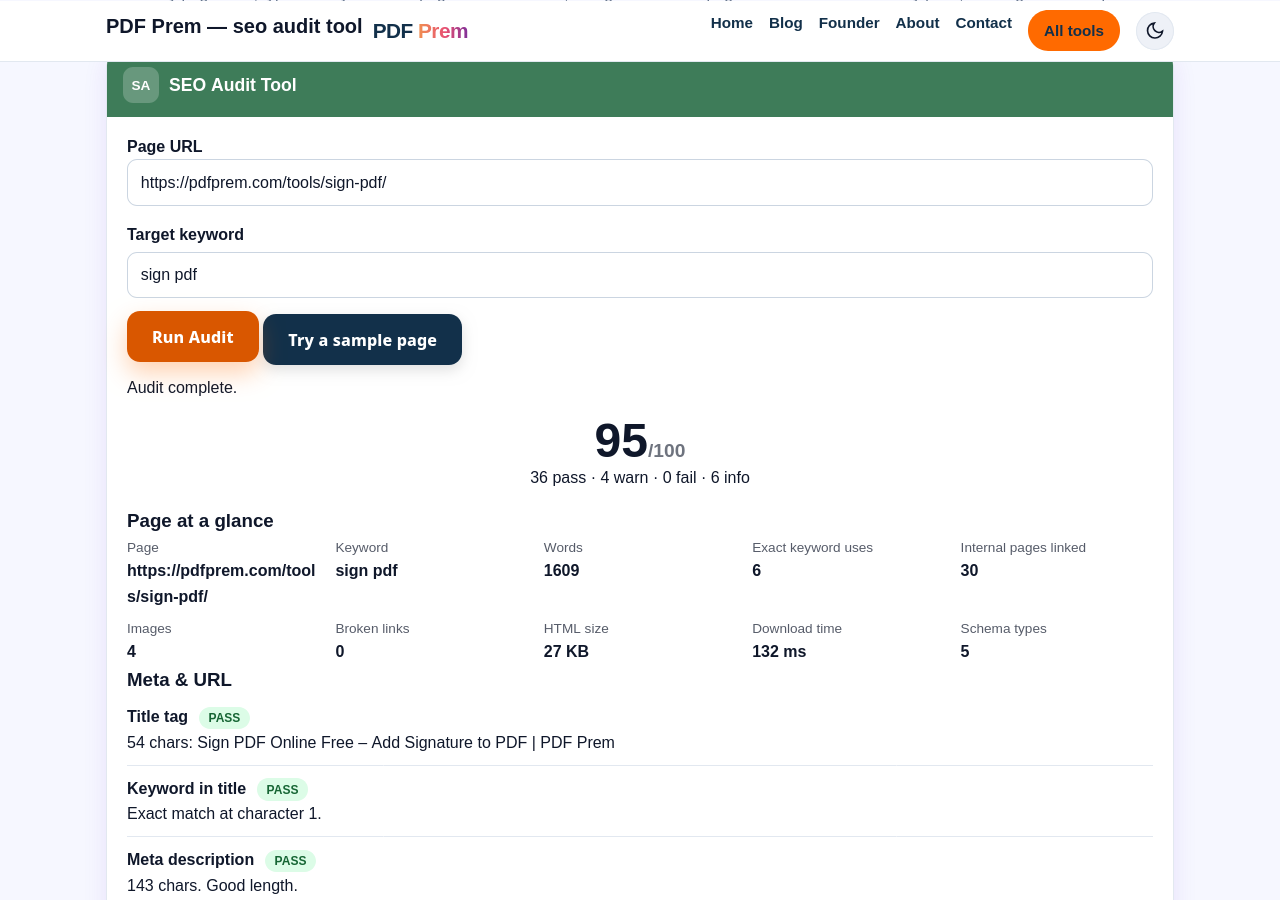
This page had no worked example at all — no numbers from a real run. So I ran the tool on two real pages of this site, plus one deliberate mismatch, all through the live audit. The audit runs on the server: it fetches the page, runs 46 checks in eight groups, and returns a score out of 100. Every number below is what the live audit returned.
| Page audited | Keyword | Score | Pass | Warn | Fail | Info |
|---|---|---|---|---|---|---|
| Sign PDF tool page | sign pdf | 95 | 36 | 4 | 0 | 6 |
| Homepage | free pdf tools | 92 | 34 | 6 | 0 | 6 |
| Sign PDF tool page | banana bread | 82 | 28 | 10 | 2 | 6 |
Both real pages scored in the 90s with zero fails. The Sign PDF page returned 1,609 words, 6 exact uses of ‘sign pdf’, 30 internal pages linked, 4 images, 0 broken links, a 27 KB page and a 132 ms fetch. The homepage returned 1,932 words, 4 exact uses of ‘free pdf tools’, 62 internal pages, 7 images, 0 broken links, a 57 KB page and a 13 ms fetch. The fetch time is the server's, not a visitor's — it changes run to run, and it is not a page-speed score.
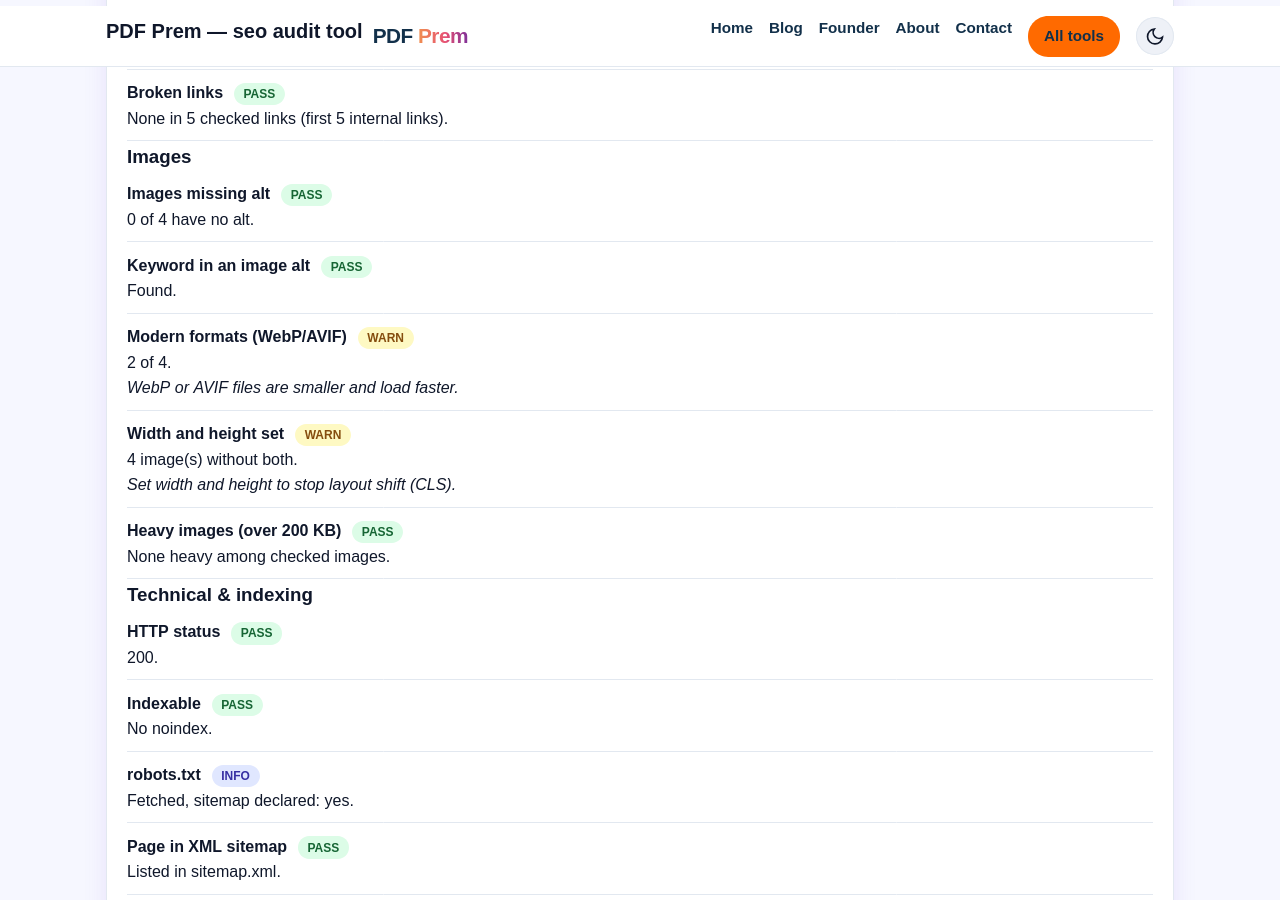
The warnings are the interesting part, because the same four appear on every run I did: two of the four images are not in a modern format (WebP or AVIF), four images have no width and height set, no compression header was seen, and the audit looks for an author name and publish or update dates that these pages do not print. The homepage adds two more: the keyword is not in the URL slug — a homepage has no slug to hold it — and five links have no anchor text. None of these is a fail, and the page already says so above: warnings are not errors, and a page can score in the 90s with warnings still showing. Fix the fails first, then the warnings that matter for that page.
One limit to keep in mind: the audit reads the page's HTML only. It cannot measure how fast the page feels to a real visitor — no Core Web Vitals, no render time. The ‘download time’ in the glance box is how long the server took to fetch the page, and it was 132 ms on one run and 13 ms on another for different pages. Treat it as a fetch time, not a speed grade.
Same page, a keyword it does not target
The Sign PDF page, audited twice with nothing changed except the keyword: ‘sign pdf’ gave 95 out of 100 with 36 passes and no fails; ‘banana bread’ gave 82, with 28 passes, 10 warnings and 2 fails. The keyword count in the glance box went from 6 exact uses to 0, and the two fails were ‘Keyword in title’ and ‘Keyword usage’. The other eight new warnings were all keyword checks too — meta description, URL slug, H1, an H2, the first 100 words, and image alt text.
That is the whole lesson in one comparison: this score is always a score for a page plus a keyword, never for a page alone. If you audit a page with a phrase it was never written for, the low score says nothing about the page — it says the keyword is wrong. Before you fix anything on a page, re-run the audit with the exact phrase that page is meant to rank for; that is the only score worth acting on.
Frequently asked questions
What does the SEO audit check?
It checks the title tag, meta description, headings, keyword placement and density, content length, readability, internal and external links, images, schema markup, social sharing tags and technical items such as HTTPS, canonical tag, viewport and robots access.
How is the score calculated?
Each check is a pass, a warning or a fail. Passes count fully, warnings count half, and info items do not count. The score is the weighted share of checks passed, out of 100.
Can I audit any website?
You can audit any public page that allows automated fetching. Some sites block bots, in which case the audit reports that the page could not be fetched.
Is the audited page URL saved or shared?
No. The URL is fetched only to run the audit and is never saved, shared or used for anything else. Please do not enter pages that need a login or contain private information.
Why did the same page score 95 with one keyword and 82 with another?
Because the score is measured against the keyword you type in, not against the page alone. I ran the same page twice: with the keyword it targets, ‘sign pdf’, it scored 95 out of 100 with no fails; with ‘banana bread’, a phrase the page never uses, it scored 82, with two fails — keyword in title, and keyword usage, 0 exact uses — and eight more warnings, all on keyword checks. The page did not change between the two runs. Audit with the exact phrase the page is meant to rank for, or the score tells you about the keyword, not the page.