
Rate this tool
No ratings yet — be the first to rate!
Total ratings: 0
Free Barcode Generator
A barcode lets a scanner read a product number faster and more accurately than a person typing it. This generator produces common barcode formats, including CODE128 for general use, EAN-13 and UPC for retail, CODE39, and ITF-14, and downloads the result as SVG for crisp printing or PNG for quick digital use. Each format has its own digit rules, so the tool refuses an input that does not fit the format rather than producing a code a scanner cannot read.
How to generate a barcode with this barcode generator
- Enter the number or text for the barcode. Check every digit, because one wrong digit produces a different product code.
- Choose the format you need. CODE128 suits general labels, EAN-13 suits retail outside North America, and UPC suits retail in the US and Canada.
- Click "Generate Barcode" and check that the bars and the printed number below them match your input.
- Download SVG for labels and packaging, where the code must stay sharp at any size, or PNG for screen use and quick sharing.
- Test-scan the printed label with a scanner app before printing a full batch.
Tested: a real EAN-13 and a CODE128, measured
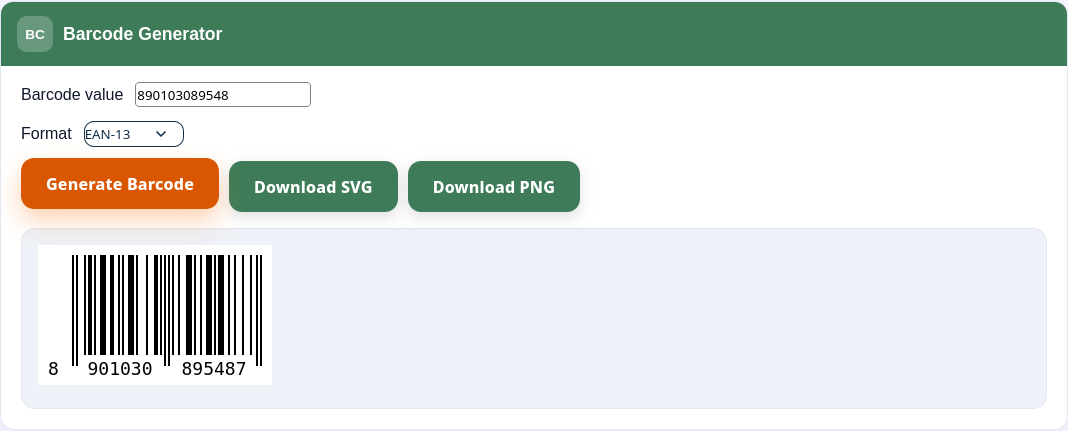
I ran this test with two codes. First, EAN-13, the retail format used in India: I typed the 12 digits 890103089548, chose EAN-13 from the format list and clicked Generate Barcode. The tool added the check digit and rendered the full 13-digit code, 8901030895487, with the printed number under the bars matching it exactly. I checked the digit by hand before trusting it: the digits in odd positions add up to 21 (8 + 0 + 0 + 0 + 9 + 4), the digits in even positions add up to 34 (9 + 1 + 3 + 8 + 5 + 8) and are multiplied by three to give 102, and 21 + 102 is 123, so the check digit is 7, because 123 + 7 reaches the next multiple of ten, 130.
The rendered EAN-13 measured 234 by 140 pixels and was drawn from 31 bars. Both downloads worked: the SVG, barcode-pdfprem.svg, was 2,375 bytes, and the PNG, barcode-pdfprem.png, was 32,274 bytes and opened as a 702 by 420 pixel image — three times the on-screen size, which is how the tool builds its PNG. The SVG’s printed number is split into three groups, 8, 901030 and 895487, which together read 8901030895487.
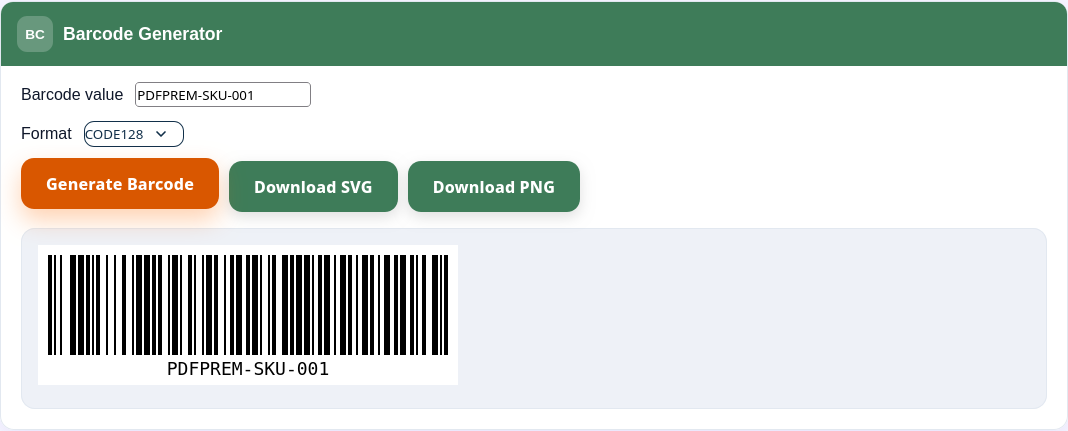
Second, CODE128 for stock control: I typed the 15-character code PDFPREM-SKU-001 — letters, a hyphen and digits — and the tool rendered it exactly, with the full code printed under the bars. It measured 420 by 140 pixels, drawn from 56 bars, and its SVG download was 2,833 bytes. For comparison, the tool loads with CODE128 already selected and the number 123456789012 in the box, rendering a 222 by 140 pixel barcode from 29 bars before anything is typed.
The tool also refuses bad input instead of drawing a barcode a scanner cannot read. Typing ABC123 or the five digits 12345 with EAN-13 selected showed the same message: “EAN-13 needs exactly 12 or 13 digits (numbers only). Try CODE128 for any text.” One honest limit: I checked the numbers, the rendering and the downloads, but I did not scan the printed label with a shop scanner, so test-scan one label on the scanner that will actually use it before printing a full batch.
EAN-13 vs CODE128 — which one your shop needs
The choice comes down to who scans the code. EAN-13 is the retail format: exactly 13 digits, a check digit at the end, and the number printed under the bars in groups. Shops and checkout scanners expect it, and in India the leading digits are normally allocated through the official numbering organisation — a self-invented number can clash with another product or be rejected by a retailer, so confirm allocation before bulk printing. If you sell through shops, EAN-13 is the one to use.
CODE128 is the general-purpose format: it takes letters, digits and symbols, so it suits stock codes, shelf labels and anything scanned inside your own business rather than at a till. In this test the 15-character code PDFPREM-SKU-001 rendered 420 pixels wide, against 234 pixels for the 13-digit EAN-13 — longer text makes a wider barcode, so leave enough label space and never squeeze the width. Use CODE128 when the code is yours to invent and only your own team will scan it; use EAN-13 when a shop’s checkout will.
Practical tips
- Use SVG for print. Vector bars stay sharp when a label is enlarged, while a small PNG stretched large turns fuzzy and unscannable — in the test, the EAN-13 SVG was 2,375 bytes and the PNG came out at 702 by 420 pixels.
- Keep a white quiet zone on both sides of the bars. Bars that run into text or a coloured edge scan unreliably.
- Never stretch a barcode unevenly. Changing its height is acceptable, but squeezing its width changes the bar spacing a scanner relies on.
- Print dark bars on a light background. Red bars on a white label are a classic failure, because many scanners read red poorly.
- Test one label on the actual scanner that will use it, not only on a phone app, before a bulk print run.
Frequently asked questions
Which barcode format should I use for retail products?
Use EAN-13 for most countries outside North America and UPC for the US and Canada. These are the standard retail barcode formats that shops scan at checkout.
Is this barcode generator free for commercial use?
Yes. The barcodes you generate are free to use commercially — on products, packaging, books and labels.
Which format is best for print quality?
Download the SVG version. Vector SVG files scale to any size without getting blurry, so they stay sharp on printed labels and packaging.
Why does it say my input is invalid?
Some formats have strict digit rules. EAN-13 needs exactly 12 or 13 digits (numbers only), UPC needs 11 or 12 digits, and ITF-14 needs exactly 14 digits. CODE128 accepts any text and is the most flexible.
What is the check digit in EAN-13?
It is a final digit calculated from the first twelve digits, used to catch typing errors. Even-position digits are multiplied by three, odd-position digits are added as they are, and the check digit brings the total up to the next multiple of ten. For 890103089548 the check digit is 7, giving 8901030895487.
Can I use any number as a retail barcode?
Not safely. Retail barcodes in India use the EAN-13 system, and the leading digits are normally allocated through the official numbering organisation for your business. A self-invented number may clash with another product or be rejected by a retailer, so confirm allocation before bulk printing.
Why does CODE128 accept text when EAN-13 does not?
CODE128 is a general-purpose format designed to encode letters, digits, and symbols, so it suits internal labels and inventory. EAN-13 is a fixed retail format that encodes exactly thirteen digits, which is why it rejects letters and wrong-length numbers.
Should I print barcodes on glossy or matte labels?
Matte is safer. Glossy labels can reflect scanner light and cause failed reads, especially under bright shop lighting. If glossy stock is unavoidable, test-scan under the shop's actual lighting before printing the batch.